
Oracle APEX - Security Basics Series: Session state and item values
One could argue that session state isn't strictly a security topic on its own, but I would state that session state and security are deeply connected and interdependent.
This second post in the series explains Oracle APEX session state and its core concepts in detail. As a prerequisite, having a solid understanding of how APEX sessions work is key. If you haven't read my previous post on the topic, I recommend checking that out first.
If we strip it down to the basics, session state is essentially just database tables storing data. These tables hold values for session items or objects stored and created at different moments during user activity. This includes:
- Page and Application item values
- APEX collections
- Built-in substitution variables (APP_USER, APP_SESSION, etc.)
- User preferences (language, time zone, etc.)
- Security attributes (session info, authorization scheme caches, etc.)
- Region states (filters, pagination, interactive report settings, etc.)
- File uploads
While it is helpful to think of session state conceptually as a single key-value store, behind the scenes Oracle APEX spreads this data across multiple internal engine tables.
If we look under the hood, APEX partitions session state across several internal engine tables. It is worth noting that these internal tables should never be queried or manipulated directly to build application logic.
As an alterative, the APEX development team exposes metadata and session state safely through public data dictionary views (such as APEX_APPLICATION_TEMP_FILES or APEX_COLLECTIONS) and documented PL/SQL APIs (such as APEX_SESSION_STATE, APEX_UTIL, or APEX_COLLECTION).
Item values
Of the session state components listed above, our main focus for this post is page and application items.
As mentioned, the values of page and application items will eventually end up stored in APEX session state in the database. This timing is critical whenever you run server-side processes that reference an item in a SQL query or PL/SQL block using bind syntax:
select ...
from my_table
where some_column = :P1_SOME_VALUE;
If you are questioning the word "eventually" in the sentence above, you are on the right track. Asking why (like a curious child) and taking nothing for granted is exactly the security-minded attitude I encourage.
Page submission
Most commonly, item values are stored in session state during page submission.
If we dig a bit into HTML basics, an HTML page contains a <body> tag that houses a <form> tag. That <form> tag has an action attribute, which instructs the browser to bundle all input elements inside the form, build a payload, and POST it to the action URL.
This submission action is typically triggered when a user clicks a Submit button, presses Enter within an input field, or when JavaScript programmatically fires the submit event.
Oracle APEX follows this exact same web standard. For a standard page submission, the HTML form's action attribute points directly to an APEX engine entry point:
wwv_flow.accept
This PL/SQL procedure receives the HTTP POST payload, parses the sent items and checksums, and processes the request server-side—writing the updated values directly into database session state before executing any Page Processing (validations, processes, and branches).
Below is a sanitized example of the raw payload sent to wwv_flow.accept during a standard page submit:
p_flow_id=100&
p_flow_step_id=9081&
p_instance=4066190930962&
p_debug=&
p_request=SAVE&
p_reload_on_submit=S&
p_json={
  "pageItems": {
    "itemsToSubmit": [
      { "n": "P9081_TAG_ID", "v": "717231", "ck": "q-pYHo23QaAyj..." },
      { "n": "P9081_TAG_NAME", "v": "Security" },
      { "n": "P9081_TAG_CODE", "v": "SEC" },
      { "n": "P9081_TAG_TYPE", "v": "GENERAL" },
      { "n": "P9081_TAG_COLOR", "v": "#611b1b" },
      { "n": "P9081_TAG_DESC", "v": "Test tag on security topic" }
    ],
    "protected": "UDkwODFfVEFHX0lEOlA...ByMaHZEzBjfWUg6yKiugw",
    "rowVersion": "",
    "formRegionChecksums": []
  },
  "salt": "332679550097025681850347527246838273605"
}
Note that whether an item's value is persisted in session state is controlled directly by the developer via the item's Maintain Session State attribute in Page Designer.
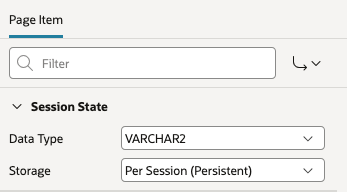
APEX provides three options for this setting:
- Per Request (Memory Only): The item value exists in memory only for the duration of the current request. When creating items inside a Form Region, APEX sets this as the default because the item is typically used only once to perform a DML operation (INSERT or UPDATE). From a security standpoint, this is ideal for data minimization—if the value doesn't need to persist, leaving it out of session state tables reduces your attack surface.
- Per Session (Disk): The value is stored in the database session state tables and remains available across subsequent page requests throughout the user's active session. This is required whenever another process, query, or page needs to reference the item later.
- Per User (Preference): Instead of storing the value in temporary session state, APEX saves it to permanent storage within user preferences. This setting is useful for user-specific settings (such as language or UI preferences) that must persist across multiple logins and sessions.
Process or computation
Setting an item value on the server side can also be done during process execution using direct PL/SQL bind variable assignment:
:P9081_TAG_DESC := 'Another tag description';
Alternatively, you can set values programmatically using the APEX Session State API (such as APEX_SESSION_STATE.SET_VALUE or APEX_UTIL.SET_SESSION_STATE), which is particularly useful when working with dynamic item names:
APEX_SESSION_STATE.SET_VALUE (
    p_item   => 'P9081_TAG_DESC',
    p_value  => 'Another tag description');
Finally, you can use a Page or Application Computation, which acts as a declarative wrapper for setting item values.
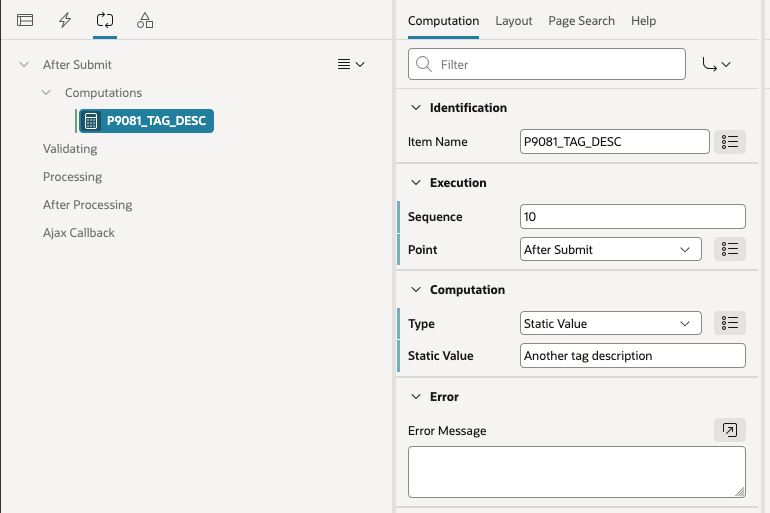
Setting Values via URL Parameters
Another way item values are set in session state is directly through the application URL.
Unlike page submissions, which rely on HTTP POST requests to process data, setting item values via the URL occurs during an HTTP GET request when requesting or navigating to a page.
The engine entry point in charge of this APEX magic is the classic PL/SQL function f. Even with APEX Friendly URLs enabled, ORDS still translates human-readable routes under the hood into calls to f, updating the designated session state items in the database before page rendering begins.
Whether a specific item value will be accepted from the URL depends on a combination of item security settings (such as Session State Protection and Restricted Characters) and page access protection rules.
However, because URL tampering is one of the most common web attack vectors, we will cover those security attributes in depth in the next blog post.
It is worth mentioning that Oracle APEX provides several built-in helpers for crafting URLs, so you rarely need to worry about manually constructing parameter strings or computing security checksums yourself.
You can generate secure links declaratively using the out-of-the-box Link Builder dialog in Page Designer (available on buttons, report columns, cards, and list items):
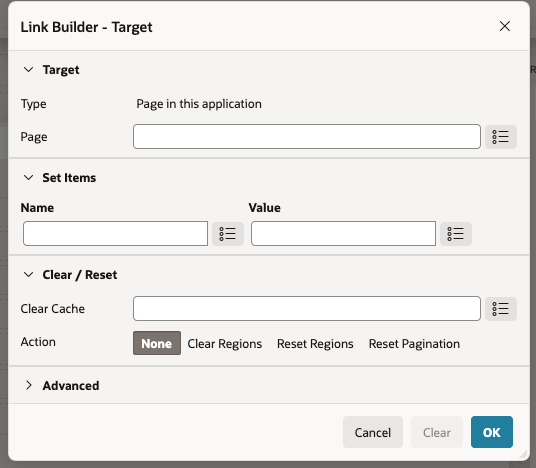
Alternatively, when constructing URLs programmatically in PL/SQL, you should always rely on APEX's URL APIs rather than concatenating raw strings manually. These APIs automatically build Friendly URLs and append the required Session State Protection (SSP) checksums behind the scenes:
APEX_PAGE.GET_URL
APEX_PAGE.GET_URL(
        p_page        => '9081',
        p_items       => 'P9081_TAG_ID',
        p_values      => :P9081_TAG_ID,
        p_clear_cache => '9081'
    );
APEX_UTIL.PREPARE_URL
APEX_UTIL.PREPARE_URL(
        p_url => 'f?p=' || :APP_ID || ':9081:' || :APP_SESSION || ':::9081:P9081_TAG_ID:' || :P9081_TAG_ID
    );
Using these helpers guarantees that your application generates compliant URLs while enforcing checksum protection whenever restricted session state items are passed across the query string.
AJAX Callback
The final way to update session state values is through asynchronous (AJAX) calls to the database.
Even if you aren't explicitly writing custom AJAX code (this can feel like an advanced topic), APEX already uses this mechanism out of the box.
Whenever you configure Page Items to Submit on a Dynamic Action, an Interactive Grid, or a Region Refresh, APEX asynchronously sends those specified item values to the database session state without requiring a full page submission.
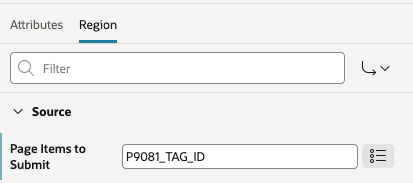
If you have a more advanced requirement—such as validating an item against the database on the fly without refreshing the page—you will need to implement an AJAX Callback process at either the Page level or Application level.
Typically, this process consists of a server-side PL/SQL block that reads item values from session state using bind variable syntax (:P9081_TAG_ID) or the APEX session state getter API (APEX_SESSION_STATE.GET_VALUE):
-- Server-Side AJAX Callback PL/SQL Code
DECLARE
    l_tag_id   NUMBER := :P9081_TAG_ID;
    l_tag_desc VARCHAR2(4000);
BEGIN
    SELECT tag_description
      INTO l_tag_desc
      FROM app_tags
     WHERE tag_id = l_tag_id;

    apex_json.open_object;
    apex_json.write('success', true);
    apex_json.write('description', l_tag_desc);
    apex_json.close_object;

EXCEPTION
WHEN NO_DATA_FOUND THEN
    apex_json.open_object;
    apex_json.write('success', false);
    apex_json.close_object;
END;
On the client side, the second half of the equation is executing this process from JavaScript using the apex.server.process API:
// Client-Side JavaScript Call
apex.server.process(
    "GET_TAG_DETAILS",
    {
        pageItems: ["P9081_TAG_ID"] // Sends item values to server session state BEFORE PL/SQL runs
    },
    {
        success: function( data ) {
            if ( data.success ) {
                $s("P9081_TAG_DESC", data.description);
            }
        }
    }
);
Asynchronous AJAX requests issue a background HTTP POST request directly to wwv_flow.ajax using the same payload format as before.
Crucially, specifying pageItems in your apex.server.process JavaScript call instructs wwv_flow.ajax to update database session state immediately prior to executing your PL/SQL callback process.
Failing to include pageItems means your PL/SQL code will read stale or uninitialized session state from the database instead of the value the user just entered in their browser.
⚠️ Security Warning: The moment you move away from declarative APEX features and into custom AJAX callbacks, you leave the engine's built-in safety net behind—Session State Protection, item checksums, and parameter validation become 100% your responsibility to configure and enforce.
Now that you have a solid grasp of what session state is under the hood and how item values travel between the browser and the database, you're ready to explore how to lock those items down—stay tuned for the next post, where we dive deep into Session State Protection (SSP) and security attributes!
About the author
- Experienced Business Analyst with a demonstrated history of working in the airlines/aviation industry. Strong research professional with an engineering focus and a strong technical background. Skilled in SQL/PLSQL, Linux System Administration. A proud Oracle APEX Consultant.
Comments
Join the discussionNo comments yet. Be the first to comment.